Guides / Cash and QR
How to Track Cash and QR Spending
Bank-linked expense apps import card transactions and miss everything else. If you pay with cash, PromptPay, or an e-wallet, here's a method that captures what you actually spend.
Most expense apps are built on one assumption: that your spending shows up as a tidy feed of card transactions they can import for you. In some places that’s true. In much of Asia it just isn’t.
Think about a normal Tuesday. Noodles from a stall, paid in cash. BTS, paid from a stored-value card. Coffee, paid by scanning a QR code. Rent, handed over in an envelope. An app that syncs only your bank account will show you a sliver of that, and the sliver it shows will be skewed toward the big occasional purchases rather than the daily reality.
Why automatic import falls short
Cash is invisible to it. Your withdrawal appears as a single 5,000 baht line. What that 5,000 baht actually became, which is two weeks of food and transport and small things, simply isn’t recorded anywhere.
QR payments usually arrive as bank transfers. What you get is a transfer to a name or an account number, with no merchant and no category attached. You still have to sort it out by hand, which was the work you were hoping to avoid.
And e-wallet top-ups quietly double-count. Moving 1,000 baht into a wallet isn’t spending. The spending happens later, when money leaves the wallet, and that part usually isn’t in the bank feed at all.
A method that works
The whole technique is one line: log at the point of payment, not later. It takes about three seconds, and there’s a short guide on making it that fast. Cash spending is only invisible if you don’t catch it while it’s happening.
Give cash its own account. In Tally, create a Cash account separate from your bank and card. Now your cash balance is a real number you can check against your wallet instead of a vague sense that there’s “some” money in there.
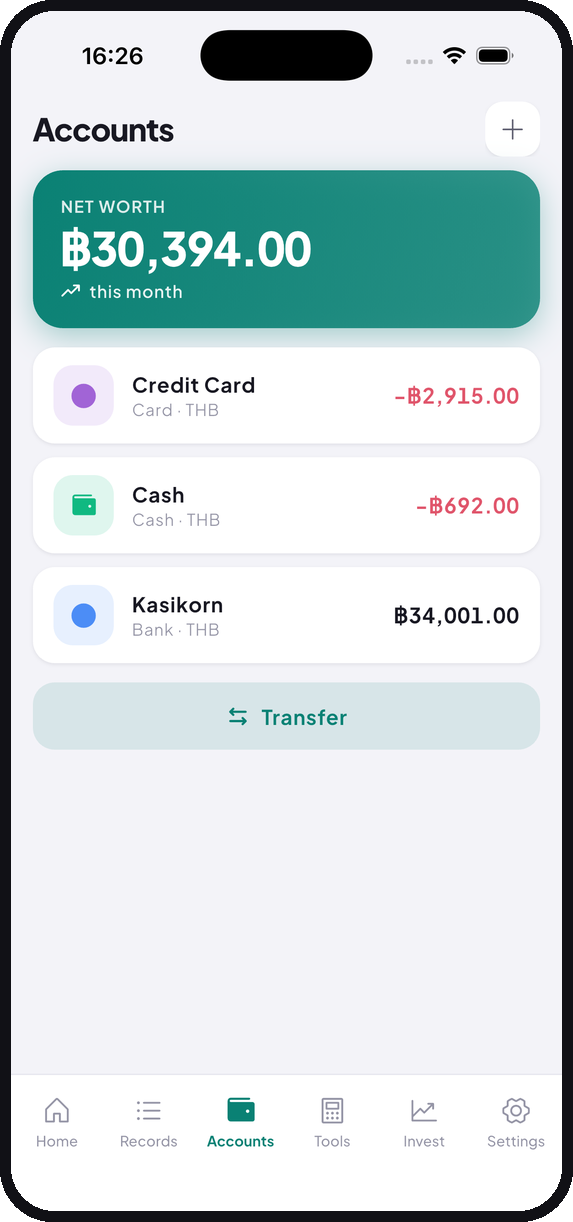
Record withdrawals as transfers rather than expenses. Taking 5,000 baht out of an ATM moves money from Bank to Cash. It’s a transfer between two of your own accounts, not money leaving your life. Log it as an expense and you’ll count it twice as soon as you start recording what the cash buys, which produces an inflated total you’ll struggle to explain to yourself in December. Tally has a Transfer type for exactly this.
E-wallets follow the same logic. Top-up is a transfer in. What you buy from the wallet is the expense.
The weekly check that keeps you honest
Once a week, count the cash in your wallet and compare it to the Cash balance in the app.
If they match, your logging was complete. If your wallet is short, you missed something, and the size of the gap gives you a decent hint about what. Two hundred baht missing usually means a meal. Forty means a fare.
It takes under a minute, and it’s the fastest way to find out whether the habit is actually holding rather than just feeling like it is. It’s also something a bank-sync app can never offer you, because it never knew about that cash in the first place.
When you pay for the group
This is the case people get wrong most often. You cover a 1,800 baht dinner for six, everyone sends you money later, and now you’re not sure what to record.
The version that stays accurate is simple. Log the full 1,800 as an expense. Then log each repayment as income in the same category. Your category total ends up reflecting what the meal really cost you, and your account balances stay correct.
The tempting shortcut, logging only your own 300 baht share, leaves your bank balance wrong by 1,500. That breaks the weekly check above, which is the one thing keeping the whole system trustworthy.
What you end up with
After one full month you’ll have something no bank-sync app can produce: a picture of your spending that includes the street food, the fares, the market stalls, and all the small QR payments.
For a lot of people that turns out to be most of their discretionary spending. It’s the part that was never in the card statement, and it’s where the surprises live.
Tally is free on iOS and Android. No account, no monthly fee.