Guides / Three-tap tracking
How to Track Expenses in Three Taps
Most expense apps get abandoned because logging takes too long. Here's how to record a purchase in about three seconds, and why that one habit decides whether expense tracking sticks.
You know the feeling. It’s nine at night, you finally open the budgeting app you downloaded with such good intentions, and you’re staring at a blank screen trying to remember what the 120 baht at lunch was for. Was that the noodles? The coffee after? You give up, put in “food, 150, close enough,” and quietly stop opening the app a week later.
That’s how almost every expense tracker dies. Not because the charts were wrong or the design was ugly. Because logging one purchase took a minute, so you put it off, and by the time you came back the details were gone.
Speed isn’t a nice extra in an expense app. It’s the entire product.
The three taps
Here’s the whole sequence in Tally:
- Tap the amount on the keypad
- Tap a category
- Tap save
That’s it. No form to fill in, no required note, no receipt photo, no confirmation screen asking if you’re sure. You can finish before the cashier hands back your change.
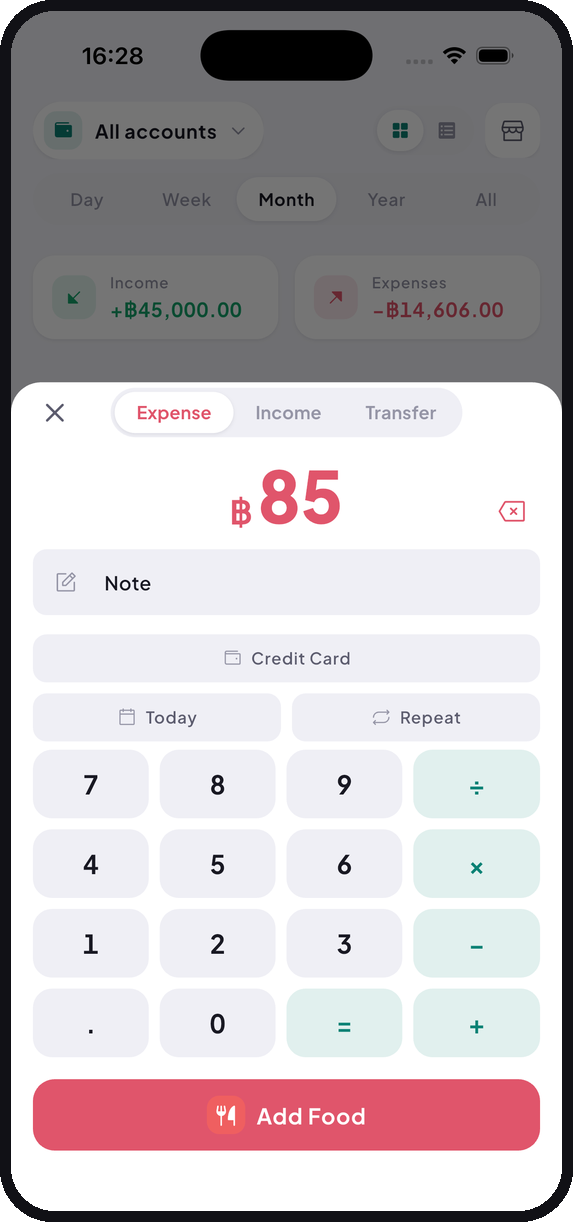
The keypad does arithmetic too, which matters more than it sounds. Splitting
a 480 baht bill three ways? Type 480 ÷ 3 and save the answer. You never
have to leave the app to work something out.
Why logging now beats logging later
Batching everything at the end of the day feels efficient. It almost never works, for three reasons.
The small purchases vanish first. A 25 baht coffee, a 44 baht BTS fare. Those are gone from memory within hours, and they’re usually exactly where the surprise in your monthly total is hiding. Nobody is shocked by their rent. They’re shocked by the sum of forty small things they never noticed.
Then your memory rounds. People shade toward comfortable numbers, almost always downward. Two weeks of gentle rounding produces a total that’s wrong in a way you’ll never be able to trace.
And skipping one day tends to become skipping forever. Once there’s a backlog, the app stops being a tool and becomes a chore. Chores get deleted.
Logging at the counter solves all three. But only if it’s fast enough to actually do at the counter, which brings us back to the three taps.
Making it faster still
Put the categories you actually use where your thumb already is. The home screen shows a grid of category shortcuts, and in Settings you can reorder them and hide the ones you’ll never touch. Most people genuinely use four or five. There’s no reason the other ten should be in your way.
Add the home screen widget. It starts an entry straight from your phone’s home screen, which removes the step of finding and opening the app at all.
Skip the notes at first. That field is optional, and the category plus the amount is what actually drives your monthly summary. Notes only earn their keep later, when you want to remember one specific purchase.
And set your recurring entries once, so rent and salary and subscriptions stop needing your attention every month. There’s a guide for that.
What the first month actually feels like
Week one takes a bit of willpower. You’ll forget things. That’s fine.
Somewhere in week two the tap sequence turns into muscle memory and stops registering as a task at all. By the end of a full month you get the thing you came for: a straight answer to where your money went, built from what you actually spent instead of what you think you spent.
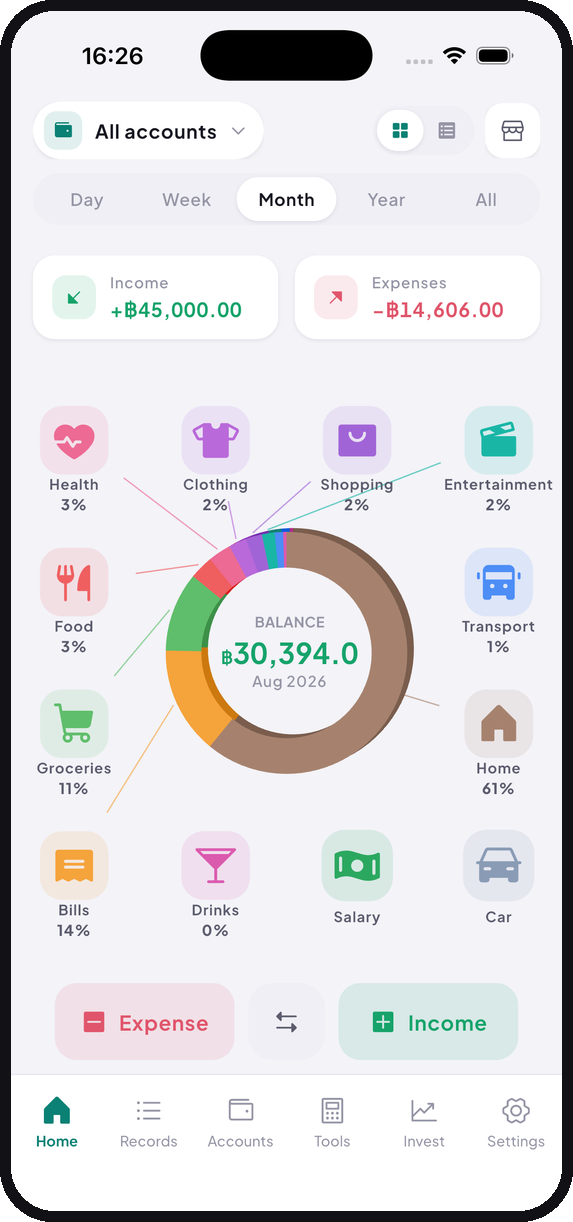
Most people find at least one category two or three times bigger than they’d have guessed. That single discovery is usually worth the month of tapping.
If you pay in cash
Apps that import transactions from your bank can’t help much when most of your spending is cash or QR, because there’s nothing to import. Entering things by hand isn’t settling for less in that situation. It’s the only approach that captures anything at all. We wrote about that here.
Tally is free on iOS and Android. No account, no monthly fee.